

Host an Exported Webflow Site on GitHub Pages
GitHub Pages is unfashionable. There's no edge network you can name-drop, no “serverless” in the marketing copy, no preview deploys per branch. It also hasn't broken or moved in a decade, costs nothing, and ships HTTPS out of the box. For a lot of exported Webflow sites — portfolios, archived client work, documentation, a personal page that needs to outlive the year — it's exactly the right answer.
This post is the “just get me deployed” version and the “here's what it can't do” version, side by side.
The deploy in four commands
Starting from the unzipped export folder:
git init
git add .
git commit -m "Exported from Webflow"
gh repo create my-site --public --source=. --push
Then, in the GitHub repo, Settings → Pages → Deploy from a branch → main / root. The site is live at https://<your-handle>.github.io/my-site/ in about a minute.

Why this works for a Webflow export
The exported folder is exactly what GitHub Pages expects: an index.html at the root, sub-folders with their own index.html, an assets/ directory, no build step. Webflow exports don't need to be compiled — they're already compiled. GitHub Pages just serves them.
There's no Jekyll step to opt out of (you can, but the default behavior treats the export as plain static files). There's no _config.yml to fight. Push, it's live.
The four limits to know about
GitHub Pages has constraints that don't bite most projects but do bite some. Read these before you commit:
1. Soft 1 GB repo limit
GitHub recommends Pages repos stay under 1 GB and warns about “reasonable use” over that. For a normal exported Webflow site (HTML + CSS + JS + a few hundred MB of images), this is generous. For an image-heavy portfolio with full-resolution photography, you'll hit it.
Two options if you're close: optimize the export's images (most JPEGs in Webflow are not aggressively compressed — running them through oxipng and mozjpeg typically halves the size), or move large assets to a CDN like Cloudflare R2 or BunnyCDN and rewrite URLs.
2. No custom HTTP headers
You can't set Cache-Control, Content-Security-Policy, X-Frame-Options, or anything else at the host level. GitHub picks the headers. For most marketing sites this doesn't matter; for anything with auth, embeds, or strict CSP requirements, it does.
If you need headers, Cloudflare Pages or Netlify give you a _headers file. GitHub Pages doesn't.
3. No _redirects file
Same shape: no way to declare 301s at the host level. If you have legacy Webflow URLs that need to redirect to new ones, you'll need meta-refresh tags or JavaScript redirects, neither of which Google likes as much as a server-side 301.
This is the single biggest reason to skip GitHub Pages for an SEO-critical migration. If the site has any existing URL structure that's changing, host somewhere that lets you do real redirects.
4. Commercial use is technically not allowed
GitHub Pages' terms restrict it from being a “free web hosting service” for commercial purposes — specifically, you can't use it to run a business or serve a commercial product. The line is fuzzy in practice (plenty of small businesses use Pages and never hear from GitHub), but if it's a real money-making site, this matters.
For personal projects, archived client work, open source project pages, and documentation — no issue.
Custom domain in three steps
The default URL is <handle>.github.io/<repo>/ which is fine for testing but no good for production. Adding a custom domain:
- In the GitHub repo: Settings → Pages → Custom domain →
yourdomain.com. - At your DNS host, add an
ALIAS(orANAME) record pointing your apex domain to<handle>.github.io, and aCNAMErecord forwwwpointing to the same. If your DNS host doesn't support ALIAS records, use four A records pointing to GitHub's Pages IPs. - Wait for DNS to propagate (usually under an hour). GitHub will auto-issue an HTTPS certificate via Let's Encrypt; tick Enforce HTTPS once it shows green.
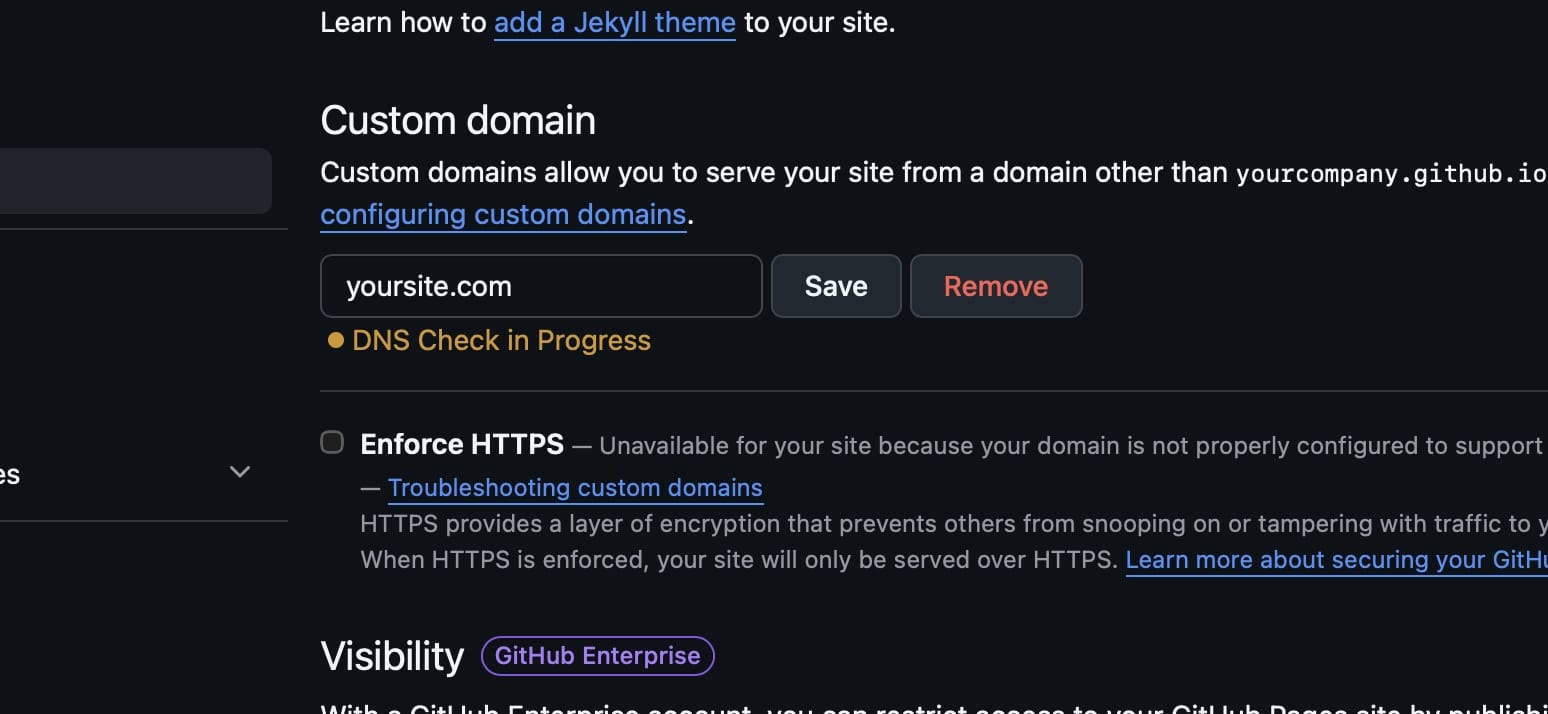
That's the full domain setup. There's no separate Cloudflare layer to manage, no “orange cloud” toggle to worry about. Apex domains work natively.
Things that come up
Webflow forms. Same story as every other static host: the Webflow form handler is gone. For a portfolio or archive site, you usually don't care. For a contact form, point it at Formspree, Basin, or a small Cloudflare Worker.
Search and analytics. Both are bring-your-own. Add Plausible, Fathom, or Vercel Analytics by dropping a script in <head>. Same for any chat widget or marketing snippet.
Trailing slashes. GitHub Pages serves /about/index.html under both /about and /about/. With no way to set redirects, you're stuck with both URLs being live. For SEO, set a canonical URL inside the <head> of each page — Webflow Export already does this on every exported page, so if you exported with our tool the canonical tags are already there.
When GitHub Pages is the right call
A simple decision tree for an exported Webflow site:
- Portfolio / personal site? → GitHub Pages. Free forever, never breaks.
- Archived client work? → GitHub Pages. The lowest-maintenance long-term home.
- Documentation site / project page? → GitHub Pages. Code and site live in one place.
- Active marketing site with redirects, headers, edge logic? → Cloudflare Pages or Netlify, not GitHub Pages.
- Anything commercial? → Look elsewhere — the terms are clear about commercial use.
I run Webflow Export and we see GitHub Pages picked roughly 15% of the time, almost always for the first two categories. The other 85% goes to Netlify or Cloudflare Pages, mostly because of the redirect limitation.
Recap
git init && git add . && git commit -m "Exported"
gh repo create <name> --public --source=. --push
# then enable Pages in repo settings
Add a custom domain via DNS. Don't use it for commercial sites or anything that needs server-side redirects. Otherwise, it's about as low-maintenance as static hosting gets.
If you don't have the export yet, Webflow Export produces the folder of static files you can git add directly. For the broader host comparison, see where to host an exported Webflow site.