

Webflow Export vs Webflow Hosting: A Real Cost & Control Comparison
I run Webflow Export, so I spend most of my week looking at exported Webflow sites — what survives the export cleanly, what breaks, and which teams genuinely benefit from leaving Webflow's hosting versus staying on it.
The honest answer is that this decision gets oversimplified in both directions. "Just export, hosting is free" ignores real engineering cost. "Webflow hosting is the best, don't touch it" ignores how much money agencies leave on the table maintaining dormant client sites.
Here's the version of this comparison I'd give a friend, with the actual numbers.
The actual monthly cost difference
Webflow's site plans (as of writing — check webflow.com/pricing for current pricing) start around $14/mo for Basic (no CMS) and climb to ~$39/mo for Business for CMS-driven marketing sites with reasonable traffic.
For a static export, the realistic alternative hosting cost looks like this:
| Host | Free tier covers | Typical monthly cost for a marketing site |
|---|---|---|
| Netlify | 100 GB bandwidth, 300 build min | $0 |
| Cloudflare Pages | Unlimited requests, 500 builds | $0 |
| Vercel Hobby | 100 GB bandwidth | $0 (non-commercial) / $20 Pro |
| GitHub Pages | 100 GB bandwidth | $0 |
| S3 + CloudFront | Pay-as-you-go | ~$1–3 for low traffic |
For a single low-traffic site, the difference is roughly $170–$470/year. That isn't life-changing.
Where the math actually matters: an agency sitting on 25 archived client sites at $23/mo each is paying ~$6,900/year for sites nobody touches. Move those onto Netlify/Cloudflare free tiers and that becomes ~$0. That's the real driver behind export demand.
What you actually give up when you export
This is where most "vs" articles wave their hands. Concretely, here's what stops working the moment you export and host elsewhere:
- Webflow Editor for clients. No more in-browser content edits without a redeploy.
- CMS collections as a live database. You get the rendered HTML, not the API.
- Native forms. Webflow's form submissions endpoint won't accept POSTs from a non-Webflow domain — you'll wire up Formspree, Basin, or your own handler.
- Site search. Webflow's built-in search is server-side and tied to the platform.
- Memberships and Ecommerce. Both require platform-side runtimes. Not portable.
- Scheduled publishing and staging. You replace these with Git branches + preview deploys, which most engineers prefer — but it's a workflow change for marketing.
- Webflow Analytics + the new optimize/AB features. Replace with Plausible/PostHog/etc.
If three or more items on that list matter to your team, exporting is going to feel like a downgrade until you've rebuilt them.
The four scenarios where the answer is obvious
After looking at a lot of these decisions, most teams cleanly fall into one of four buckets.
1. Marketing-heavy SaaS with a non-technical content team. Stay on Webflow hosting. The friction of moving content updates to a PR-based workflow will cost you more in marketing velocity than you save in hosting fees. The math only flips if your team is already comfortable with Git.
2. Agency with a portfolio of low-change client sites. Export. The aggregate hosting bill on archived sites is the dominant cost, and those sites barely change. Build a repeatable export-and-deploy pipeline once; apply it to the whole portfolio.
3. Engineering team integrating the marketing site into a larger app. Export, and probably feed the output into Next.js or Astro. The value isn't hosting cost — it's having the marketing pages live in the same repo, CI, and design system as the product.
4. Solo founder or freelancer with a single landing page. Stay on Webflow if you're already there. The 20 hours you'd spend learning the export-and-host workflow is worth more than $170/year. Migrate only if you outgrow the page.
If you're not in one of these four, the decision is more about team temperament than economics. Engineers tend to feel constrained by Webflow hosting before the numbers justify leaving; marketers tend to feel exposed by Git workflows before the numbers justify staying.
What native Webflow export actually gives you
Worth being precise here, because there's a lot of confusion. Webflow's native export (under Site Settings → Export Code, requires a paid workspace plan) outputs:
- A
.zipcontainingindex.html, page HTML files, acss/directory, ajs/directory, animages/directory, andfonts/. - All CMS-driven pages rendered as static HTML at the time of export.
- All Webflow interactions and animations, since those run client-side via
webflow.js.
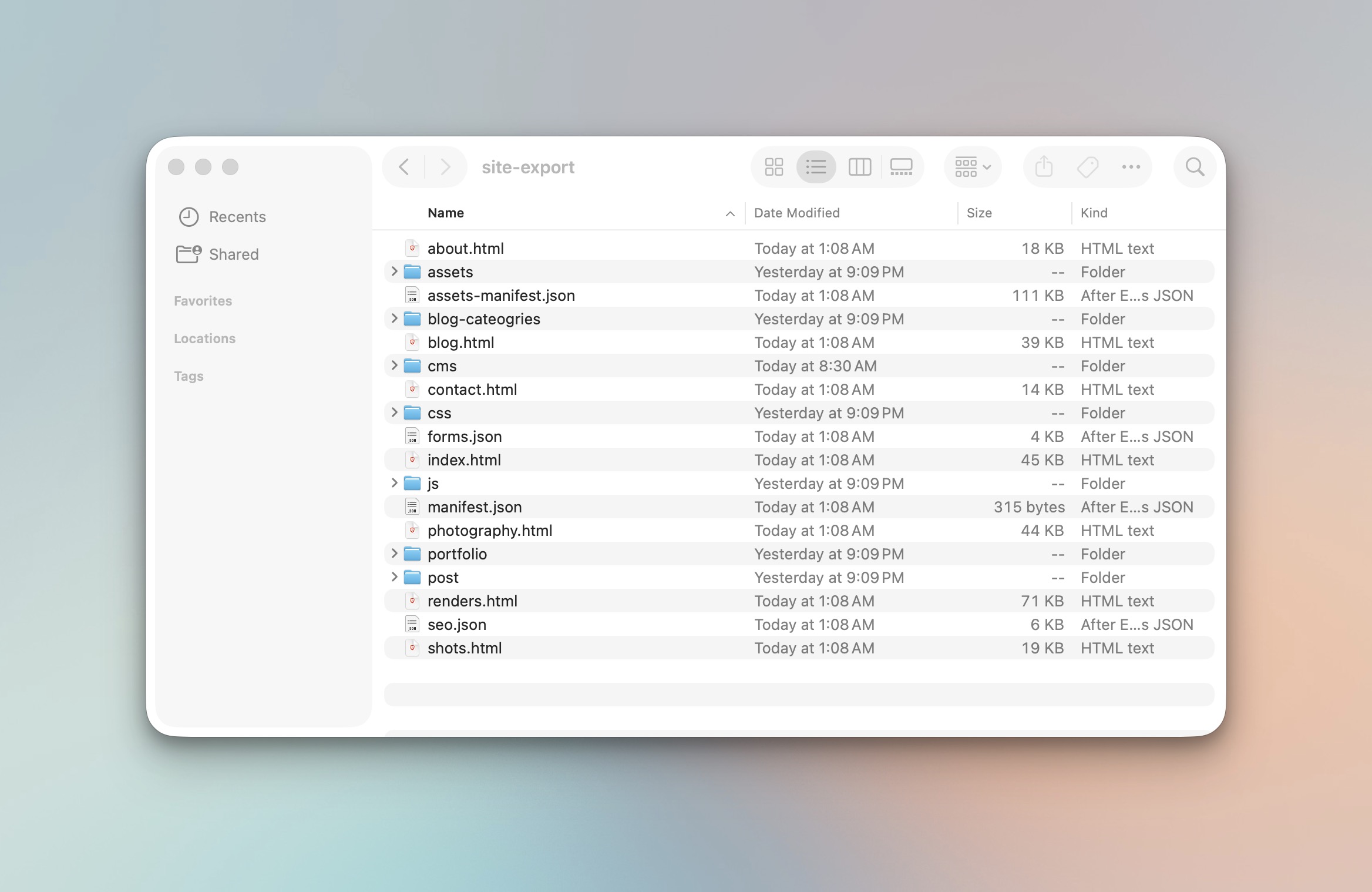
What's not in that zip: the CMS as a database, any form handlers, the Webflow Editor, or anything served from *.webflow.io that depends on Webflow's runtime. For a deeper look at the CMS side specifically, see what actually survives a Webflow CMS export.
For most marketing sites, the rendered output is genuinely 95%+ of what visitors experience. The remaining 5% is where engineering work lives.
Where Webflow Export (the tool) fits in
The native export works — but it has real limitations. It requires a paid workspace, it doesn't crawl pages that aren't directly linked, it strips some attributes, and it doesn't export your CMS as structured data — only as rendered HTML. The tool I built handles those gaps: it crawls the published site, preserves URL and asset structure, exports each collection as JSON + Markdown + MDX alongside the rendered pages, and outputs a deploy-ready bundle that drops into any of the major static hosts with no rewriting.
The pitch isn't "leave Webflow." It's "make leaving optional, so the decision is yours and not the platform's."
The migration mistake that actually loses rankings
This is the part most teams underestimate. The export itself rarely damages SEO — broken migration plumbing does. The specific failures I see repeatedly:
- Trailing slash inconsistency. Webflow serves
/aboutand/about/interchangeably; Netlify and Vercel don't by default. Pick one, set redirects, update your canonical tags to match. - Lost
sitemap.xmlandrobots.txt. Native export doesn't always include these. Regenerate them against the new domain before going live. - Asset path drift. Webflow's CDN URLs (
uploads-ssl.webflow.com/...) get rewritten on export. If you don't replace them consistently, you get mixed-content warnings and broken Open Graph images. - Missing 301s for renamed pages. If anything moved during the migration, the old URLs need redirects. Netlify's
_redirectsfile and Vercel'svercel.jsonboth handle this in a few lines. - Form endpoints pointing nowhere. Forms will silently fail unless rewired to a real handler. Test every form on staging before cutover.
Roughly two-thirds of "we exported and lost rankings" stories I hear are item 1, 2, or 3.
So: which is better?
Better question: which is better for your specific situation in the next 12 months.
- If your honest answer to "who edits the site weekly?" is "non-technical marketer," stay on Webflow hosting.
- If your honest answer is "an engineer, or nobody," export.
- If you're an agency, the answer is almost always "design in Webflow, give the client an exported, portable deliverable, and let them choose."
The shift I keep seeing is that the third answer is becoming the default for serious agencies. Clients increasingly treat exportability as table stakes, the way they treat "do we own our domain?" That's the bigger story under this comparison.
Further reading
- Webflow's official export documentation
- Netlify's guide to creating deploys
- Vercel's deployment documentation
If you're weighing this decision and want a sanity check on your specific site, run an export — seeing the actual output usually makes the tradeoff a lot clearer than reading about it.